
Plugins
Aeon Assist: the knowledge base
Where the assistant's knowledge comes from, how it stays up to date, and how the publishing guard stops a broken sync.
Last updated 16 November 2026
What the assistant knows comes from the site’s own pages, posts and products, plus any help articles you write. Change the text on the site, and the assistant follows.
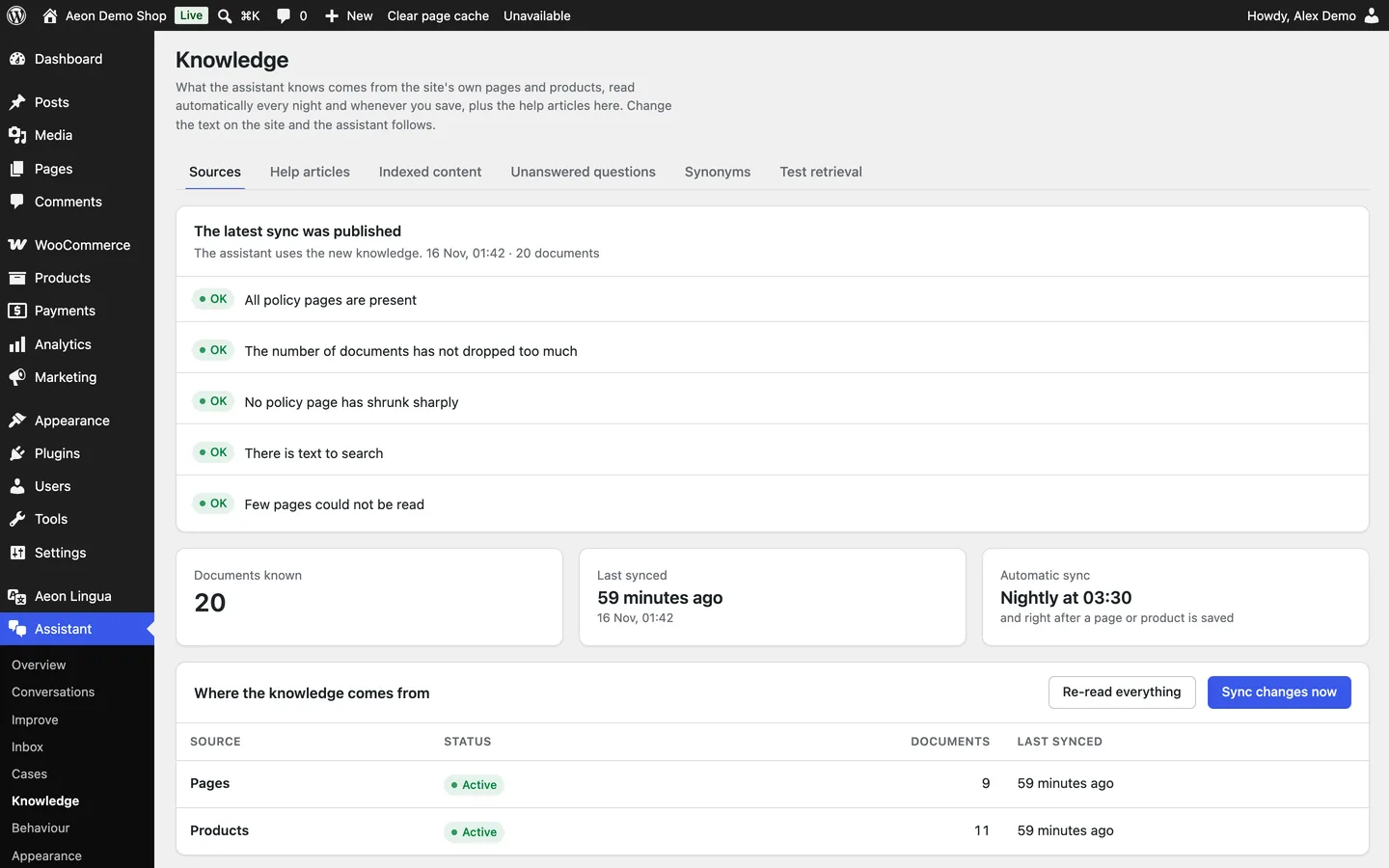
How it stays up to date
- Pages, posts and products are read every night and right after you save a page or a product.
- Sync changes now reads what has changed since the last time.
- Re-read everything reads all sources from scratch. From the command line:
wp aeon-assist sync --full.
Line breaks and tables are kept, so an address on several lines or a shipping table with column headings reaches the assistant intact.
The publishing guard
A new sync is checked before the assistant starts using it. In the demo shop, the checks were:
- All policy pages are present.
- The number of documents has not dropped too much.
- No policy page has shrunk sharply.
- There is text to search.
- Few pages could not be read.
A sync that fails the checks is stopped, so a broken sync does not reach your customers.
The tabs
| Tab | What it is for |
|---|---|
| Sources | The latest sync, the checks and where the knowledge comes from. |
| Help articles | Your own articles for things that are not on the site. |
| Indexed content | What the assistant can find, document by document. |
| Unanswered questions | Questions the assistant could not answer well. |
| Synonyms | Words your customers use for the same thing. |
| Test retrieval | Try a question and see which texts the assistant finds. |
Help articles can also be imported from a directory with wp aeon-assist kb import <directory>.
Fill the gaps
- Look at Unanswered questions, or Questions without good answers on the Overview page.
- If the answer belongs on the site, add it to the right page. The assistant reads it when you save.
- If it does not belong on the site, write a help article.
- Use Test retrieval to check that the right text is found.
Improve
Customers rate answers with Was this helpful? Yes / No. Under Improve, you go through poorly rated answers with a coach. The coach proposes changes to the knowledge or to the rules, and nothing changes until you approve it.
Facts
The facts you approve in Get started cover what must always be right, such as delivery, returns and contact. The fact list holds at most 1,500 words.