
Platform
Front-page news threads
Group related front-page reporting under its primary topic without losing editorial control.
Last updated 14 October 2026
News threads bring several front-page articles about the same developing story together as one topic-led package. A thread has a topic heading, a lead article and compact continuations, so readers can follow the story without seeing the same event repeated as unrelated cards.
Prepare the topic
Assign a clear primary topic to every article that belongs in the same continuing story. The primary topic is the thread’s organising signal, so reuse the established topic rather than creating spelling variants or overlapping labels. An article with no suitable topic remains an ordinary front-page item.
Choose a topic that represents a coherent editorial story, not merely a broad desk or a person mentioned in passing. See article topics, story threads and tags for the distinction between topics, categories and tags.
Choose the thread behaviour
Each topic can use one of three behaviours:
- Automatic creates a thread when the topic reaches the site’s configured number of eligible, recent front-page articles.
- Always allows a topic to become a thread even when it has only one eligible article. Use this sparingly for a clearly branded or high-priority continuing story.
- Never keeps the topic out of front-page threads, even when several articles share it.
The setting is editorial judgement, not a way to manufacture prominence. Review it when the event ends or the coverage changes shape.
How a thread reaches the front page
Only eligible articles in the principal front-page feed are considered. The theme groups them by primary topic within the configured recency window and ranks each package by how many articles it has, how widely they are spread over the period and how recent they are. A thread then sits in the flow where its newest article would have been, rather than in a reserved position. The lead is the newest article; remaining articles appear as continuations and the topic heading leads to the topic archive. A topic can also be pinned so that its thread is always shown while it is active.
A fresh article on an active topic reactivates the package, moving it back into the current front-page conversation. This is useful for real developments, but it is not a substitute for reviewing whether the story still deserves its position.
Override for one article
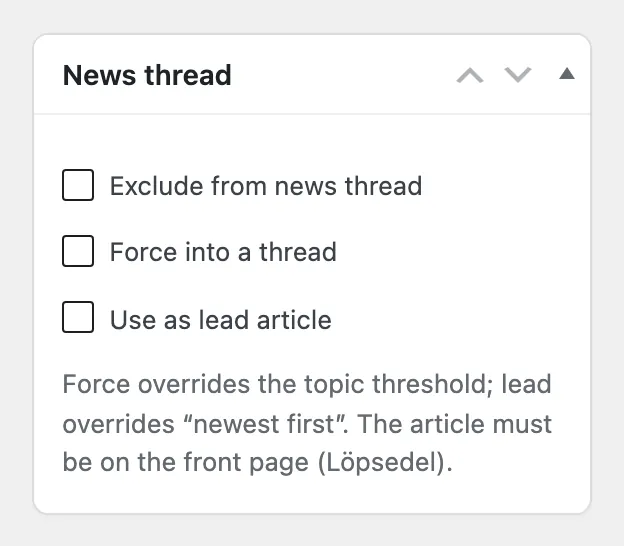
Force into a thread lets an article form or join a thread even when its topic has not reached the minimum number of articles. Use as lead article makes it the thread’s lead instead of the newest article. Both require the article to be on the front page. Aeon News Options › Front page threads lists the articles that were left out of a thread and why.
Use the article-level Exclude from news thread control when a story should remain in the principal feed but should not join its topic package. Typical cases include a distinct opinion piece, a sensitive follow-up or an article whose presentation should stand on its own. The exclusion affects only thread membership; it does not unpublish the article or remove its topic.
Editorial check
Before publishing, confirm that the articles genuinely belong together, their primary topic is consistent and the newest lead gives the right entry point. Preview the front page on desktop and mobile after a major update. Then check front-page hierarchy for the wider edition and continuous reading for the article-to-article path.