
Platform
Aeon Ad Manager
The platform's own ad system. Ads, groups and placements, a planner for bookings, and statistics that belong to the newspaper.
Last updated 31 October 2026
Aeon Ad Manager is the ad system of the Aeon News platform. It runs inside WordPress next to the theme and stores everything in its own database tables. It needs no third-party ad plugin and no outside service. The newspaper owns the ads, the rules and the statistics.
It works with the theme’s widget areas and in-article positions, with continuous reading and with dark mode. Ad Manager follows the site’s consent settings and works behind page caching.
Ads
An ad can be:
- an image with a link;
- your own HTML;
- an HTML5 package;
- a Google Ad Manager or AdSense tag;
- one of the platform’s formats, such as a topscroll, midscroll, skin, reel, sticky ad or interstitial. How they look and are built is described in Building high impact formats.
Every ad has an advertiser, a status and an optional period with a first and last day. It can also be limited to certain devices: computer, tablet or phone.
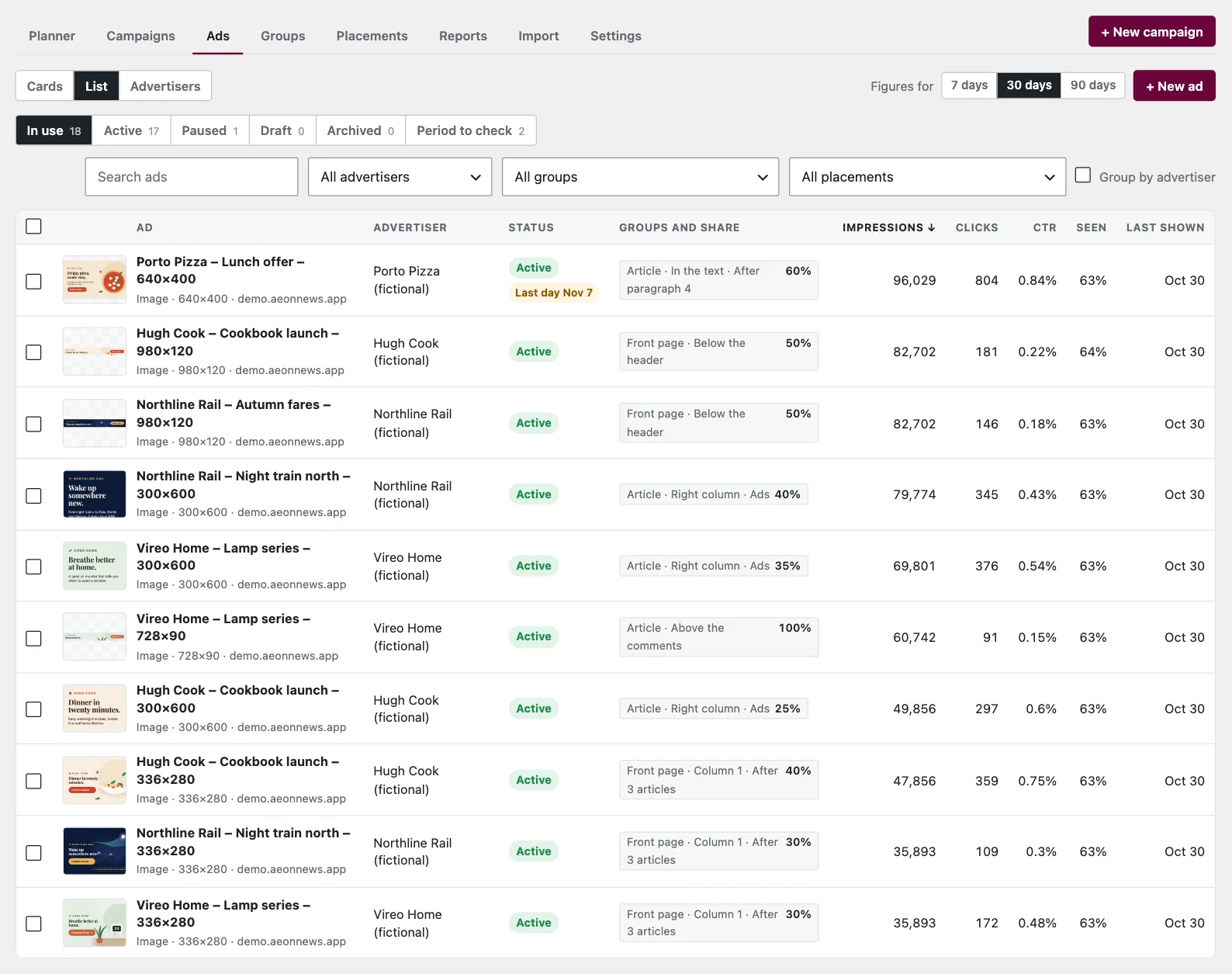
Replace creative uploads new artwork or code for the same ad. The old version keeps its figures, and the ad keeps its place in groups and campaigns. Ads that start soon, end within two weeks or have passed their last day are marked. The filter Period to check collects them.
The page of an ad
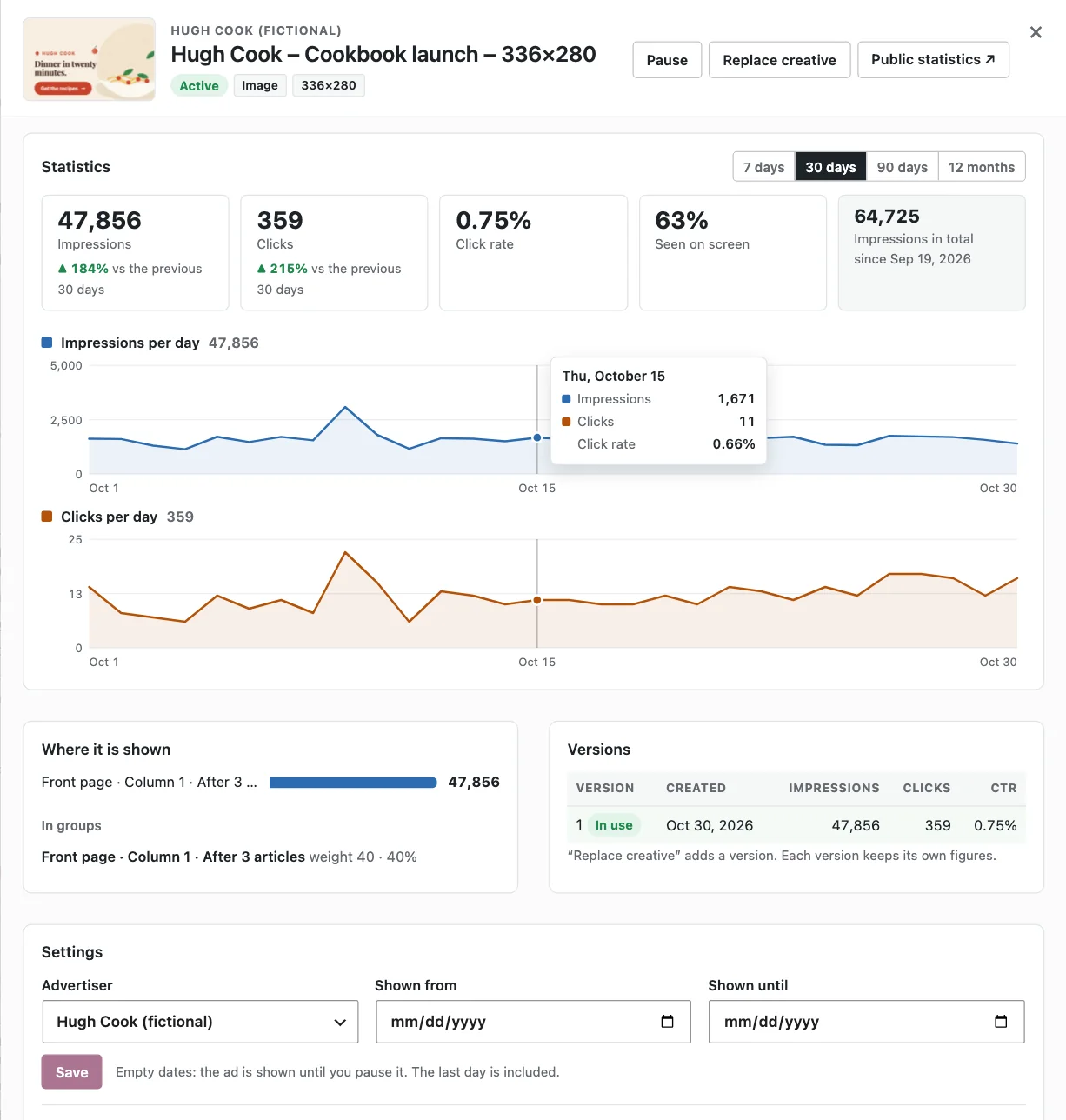
Click an ad to open its page. It shows the ad’s impressions and clicks compared with the previous period, a chart for each per day, and where the ad was shown. It also lists the groups the ad rotates in, with its share in each, and every version with its own figures. You can change the advertiser and the period on the same page.
Groups and placements
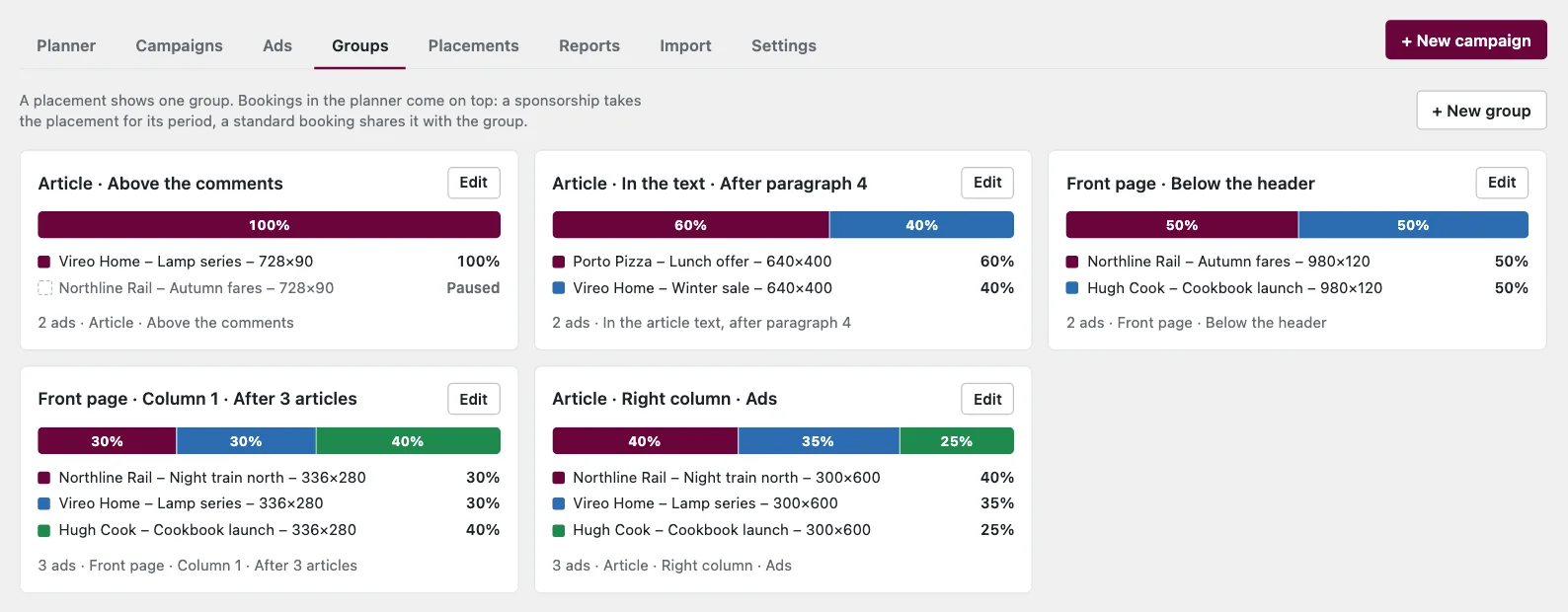
A placement is a position on the site, for example the ad area in the article’s right column or the position after paragraph 4 in the article text. Each placement shows a group: the ads that take turns there all the time. Each ad has a weight in the group, which the screen shows as a share of the impressions. A weight of 0 keeps an ad in the group without showing it.
Placements lists every position, grouped by where it appears. Each row shows:
- its group, which you can change directly;
- impressions over the last seven days;
- the fill rate, the share of page views where an ad was actually shown;
- the bookings for the next two weeks.
A group can also show several ads side by side in a grid, for example a row of partner logos. Each page view picks different ads by weight, and each one is counted on its own. A placement can show the next ad after a while: when the reader has had the ad in view for 30 seconds or more, another ad from the group takes its place. This is off unless you switch it on.
Planner and campaigns
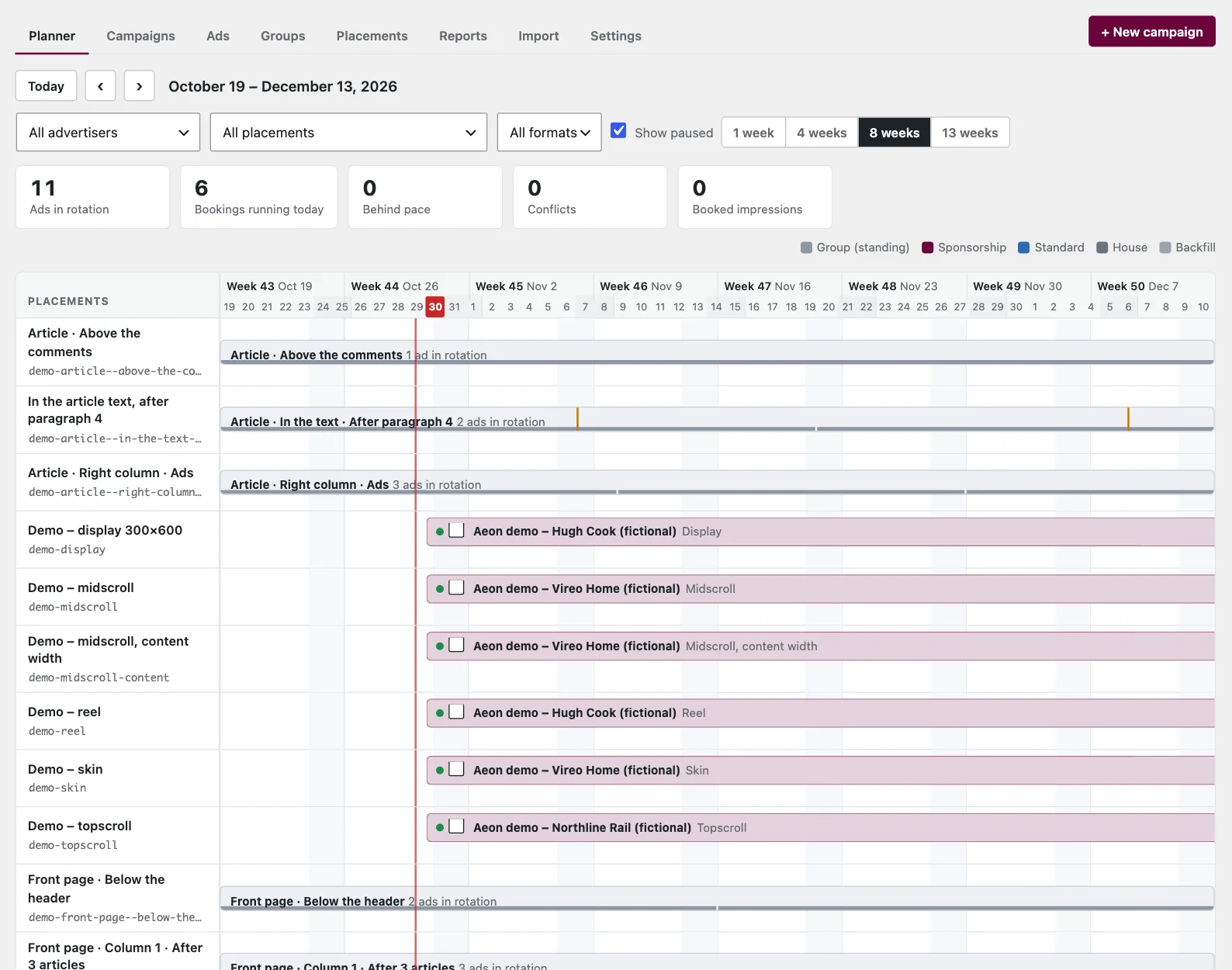
The planner shows every placement on a calendar. A grey band is the group that is always shown there. Coloured bars are bookings placed on top of it, and each booking has a priority:
- Sponsorship takes the placement for its period.
- Standard shares the placement with the group and is delivered in step with its goal.
- House is your own ad and is shown when nothing paid is due.
- Backfill is AdSense or Google Ad Manager, used only when nothing else can be shown.
You can drag a booking to move it, or drag its ends to change its dates. The planner reports bookings that are behind their goal and bookings that collide.
Where ads are not shown
Under Settings you can turn ads off for:
- the front page, archives, search, pages or articles;
- chosen categories, tags or topics;
- single articles you choose, and sponsored and partner articles;
- articles older than a given number of days;
- logged-in readers with certain roles, such as subscribers.
Editors can also switch off ads in a single article from the editor’s Ads box. On a page without ads, the ad areas are left out entirely, so no empty space remains.
Statistics and reports
Ad Manager counts:
- impressions;
- the share of ads actually seen on screen, and how long they stayed in view;
- clicks, including clicks on HTML ads that link out from their own frame.
Bots are not counted. Each figure is counted once per page view.
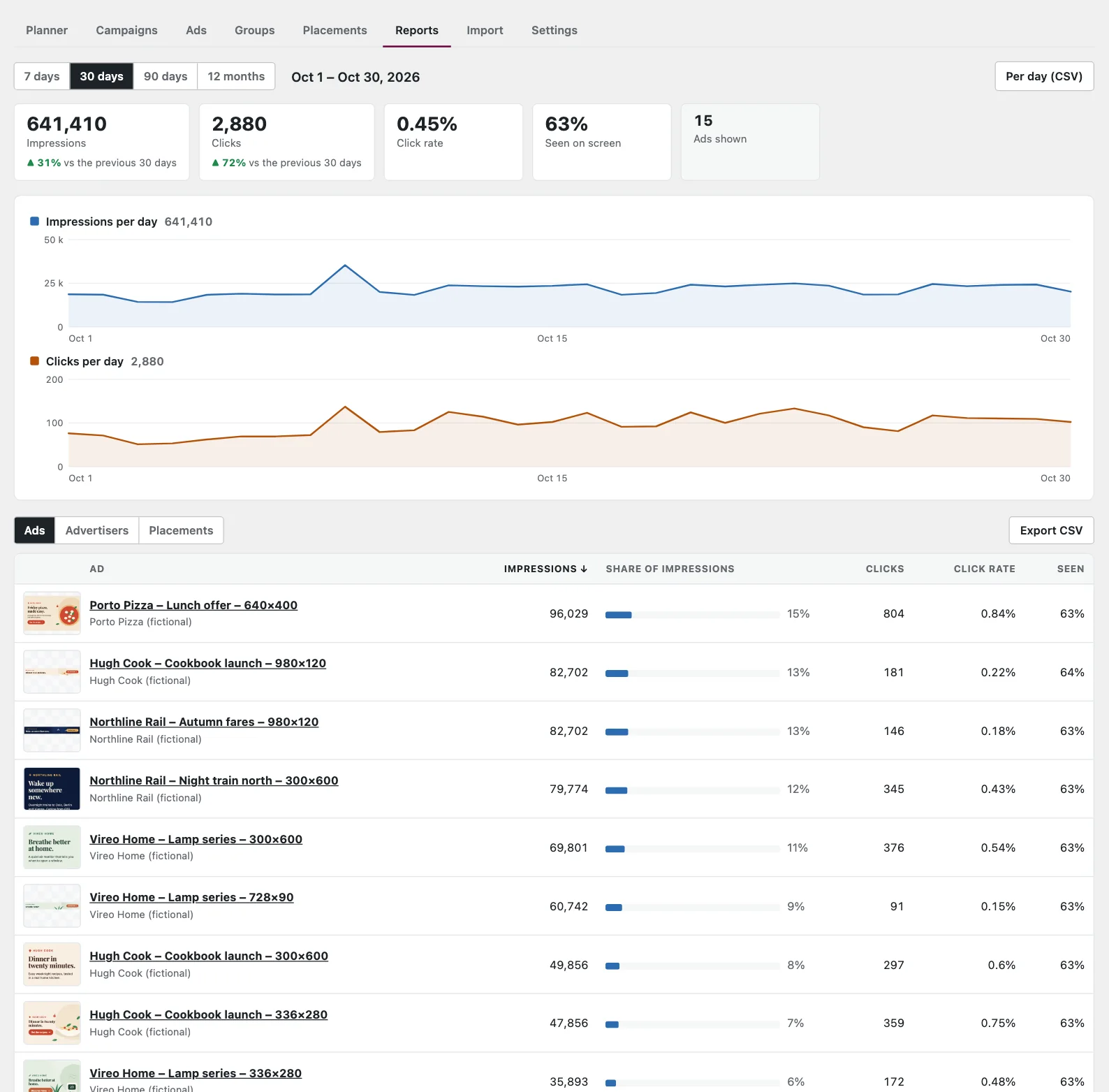
Reports covers 7, 30 or 90 days or 12 months:
- totals compared with the previous period of the same length;
- impressions and clicks per day;
- a breakdown by ad, advertiser or placement, each with its share of the impressions.
Each breakdown can be exported as CSV.
On the dashboard, a box shows the last seven days and the most shown ads.
Statistics for advertisers
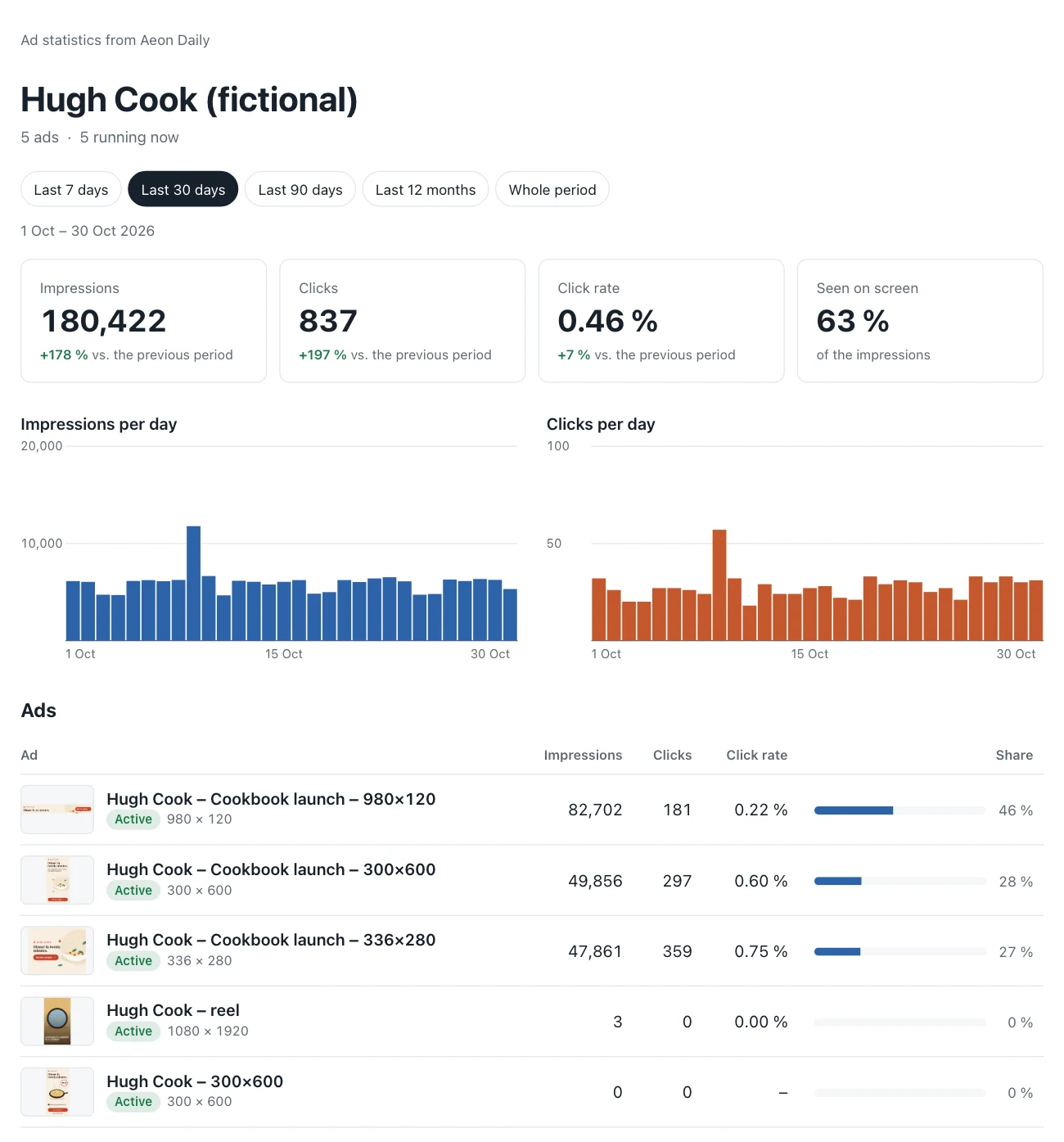
Every advertiser has its own statistics page, and every ad has one too. The links can be sent to the advertiser and need no login. The pages show:
- the key figures against the previous period: impressions, clicks, click rate and the share seen on screen;
- impressions and clicks per day, or per week or month over long periods;
- each ad with its artwork, period and share of the impressions, and where the ads were shown;
- the figures per day, which can be downloaded as CSV.
The reader can choose 7, 30 or 90 days, 12 months or the whole period. The pages work on phones and in dark mode. A link can be replaced at any time; the old address stops working at once.
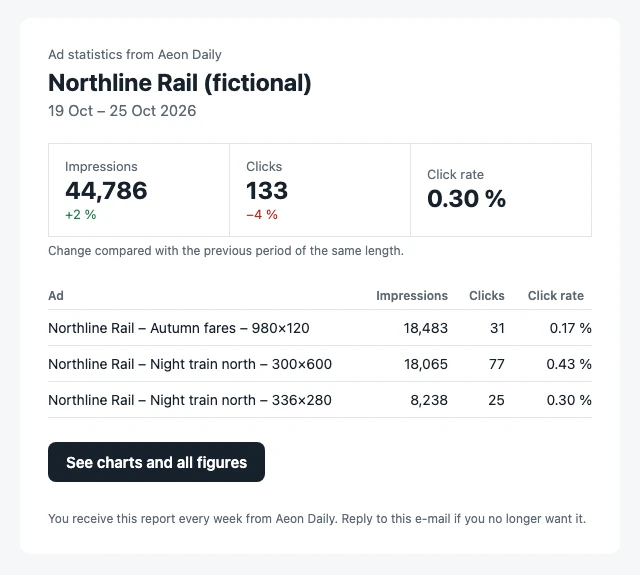
Reports by e-mail. An advertiser can get the figures by e-mail every week, on Monday mornings, or every month, on the 1st. A report goes to up to ten addresses and links to the statistics page. A period without impressions sends nothing, and you can send a sample to yourself first.
Statistics can be turned off or limited to impressions and clicks. Old figures are cleaned up automatically after a period you choose.
Agents and ads.txt
Ad Manager has a REST API for agents and integrations, with application passwords and its own roles: ad manager, ad agency and ad reports. An agency can deliver a finished campaign through it, as a draft with a preview link; see Ad Manager REST API. The site’s ads.txt can be edited under Settings.
Moving from Advanced Ads
A site that uses Advanced Ads can move without a gap. The import does three things:
- copies the current ads, groups with their weights and the widget positions;
- copies the daily statistics for the ads that are moved, so their history continues;
- keeps the per-article settings for articles without ads.
Each placement is then switched over one at a time, and Advanced Ads keeps showing ads in the others until then. Contact us before you start; we plan the switch with you.