
Platform
Republishing and original sources
Lift an archive article back onto the front page, now or later, and credit texts first published elsewhere.
Last updated 14 October 2026
Strong journalism deserves more than one day on the front page. Aeon News lets editors republish an existing article while readers and search engines still see when it was first published.
The Republish box
The Republish box appears in the sidebar once an article is published.
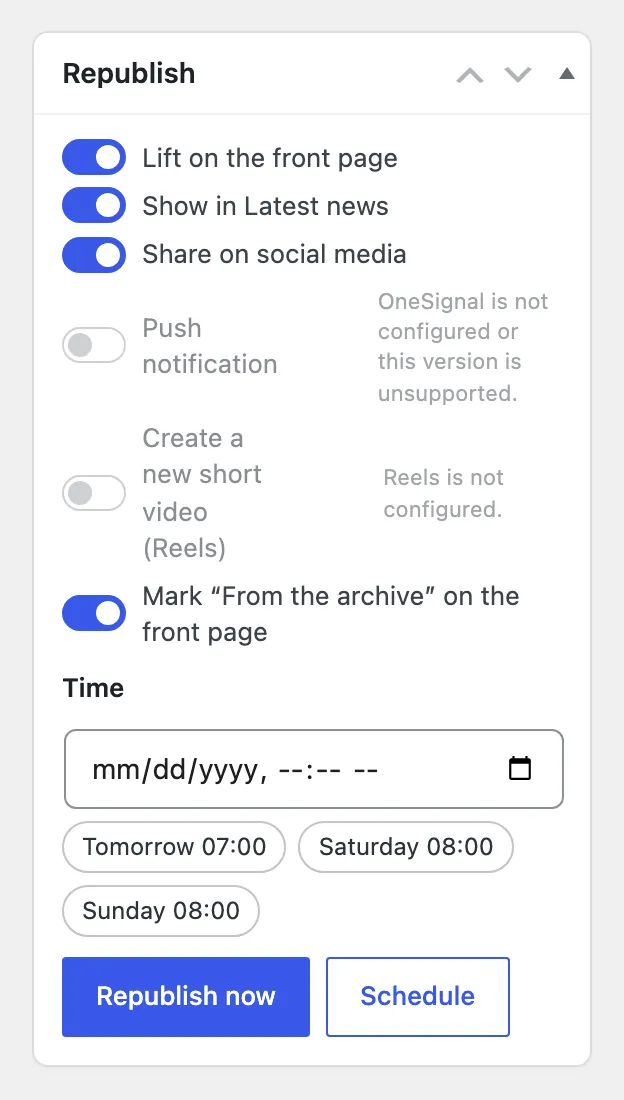
| Choice | What happens |
|---|---|
| Lift on the front page | The article returns to the top of the front page with today’s time. |
| Show in Latest news | The article appears in the Latest news list again. |
| Share on social media | A new share through Aeon News Poster or the site’s sharing plugin. |
| Push notification | A new push notification, where push is configured. |
| Create a new short video (Reels) | A new reel, where Reels is configured. |
| Mark “From the archive” on the front page | A small label tells readers that the article is not new. |
Republish now acts at once. Schedule plans it, with quick choices such as “Tomorrow 07:00” or “Saturday 08:00”; until then the article stays as it is. A planned republish can be changed or cancelled.
The first publication date is kept
The article keeps its first publication date, shown to readers where relevant and given to search engines, so a republished text is never presented as new reporting.
Texts first published elsewhere
When a text first appeared somewhere else, for example in another newspaper or on the writer’s own site, enter the original address under Previously published in Genre & writers. The source and date can be filled in from the address. You decide whether search engines should treat the original as the source or this article.
For agents and automation
Republishing can be scheduled and cancelled through the editorial API. On local and test copies of a site, republishing never sends shares, push notifications or reels.